Sources
A source tells Pivot Shift where an event belongs. It can represent a hospital, clinic, employer, private calendar, Google calendar, or ICS feed.
Work and life sources
Choose Work for sources that should contribute to work-hour and fatigue calculations. Choose Life for personal calendars and other commitments. All-day events and events explicitly excluded from fatigue calculations remain visible but normally do not add work hours.
Create a source from Import, give it a recognisable name, and choose whether it belongs to Work or Life. You can then use the manual shift creator or import a spreadsheet, calendar file, Google calendar, or subscription into it.
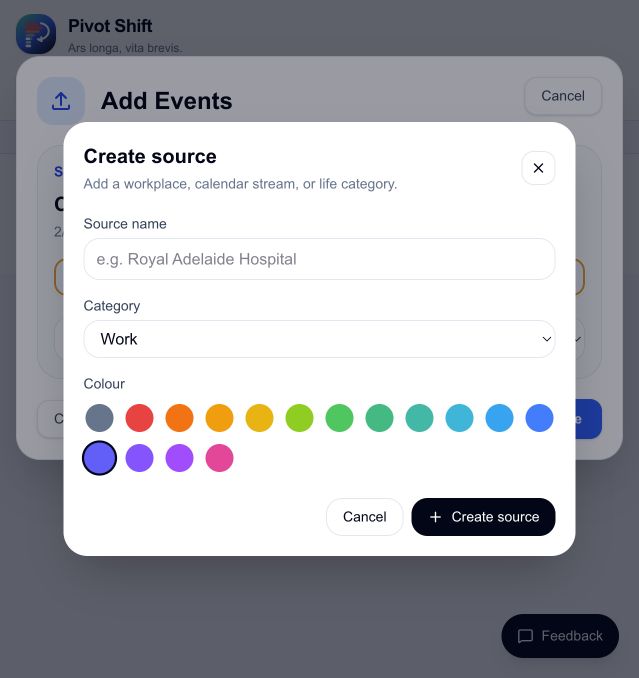
Source colours
Each source has a colour used throughout the calendar. Distinct colours make overlapping workplaces and personal commitments easier to scan.
Connected sources
Google and ICS sources keep a reference to their external calendar. Pivot Shift displays their imported events without changing the original calendar. A one-time file or spreadsheet import becomes Pivot-managed data after it is saved.
The manual shift creator can add shifts to any existing source. Shifts added to a Google or other external source are Pivot-only overlays: they appear in Pivot Shift but are not written back to the external calendar.
To add a work pattern directly from Settings, open Sources, find the source, and choose Manual shift creator. The Roster layout menu inside a roster profile controls how Pivot Shift reads spreadsheets; it is not a list of event-creation methods.
Before removing a source
Check which events and import profile belong to it. Removing or archiving a source can affect what appears in your calendar and analytics. If you only want less visual noise, disable or filter the source instead of deleting its data.
See Adding and Importing Events for adding data to a source.